Tuesday, July 24, 2012

Assignment: Individual Blog Post #7 :: MIDTERM REFLECTIONS

This post is due before class on Thursday, July 26 - AFTER we have screened your portrait of a place in class.


What have you learned so far? Consider:
- what you've learned about filmmaking/storytelling and directing the camera
- working with crew; how is communication key to this work?
- the technical aspects (all the cameras & lights)

What are your strengths? What seems the most challenging? What is rewarding?

350-500 word post.


POST ENTRY ON YOUR BLOG!

Monday, July 23, 2012

TUTORIAL: How to transcode DSLR footage

Our Canon DSLR cameras (5D, 7D, and T2i cameras) film in H.264 codecs that don't play nice with FCP7. You will want to transcode (convert) your footage into Apple ProRes 422 LT.

You can either convert using *free* software available for Mac and PC: MPEG STREAMCLIP (It is already installed on all the computers in 130), or you can use Compressor, part of Final Cut Pro Studio suite, and is also installed in 130.

Here's goes MPEG STREAMCLIP Tutorial:


Here is the tutorial on using Final Cut Studio's Compressor software:

Wednesday, July 18, 2012

Assignment: Individual Blog Post: #6 :: LIGHTING STYLES

This post is due before class on Thursday, July 19.


Find and embed 5 - 10 photographs and/or examples of artwork that show “beautiful” light. 


Write a 250-word post on what you’ve chosen and why, in terms of framing, composition, use of color and lighting… Why are these images so compelling? Use technical terminology about type or quality of light,  describe color palette, and use terminology from your Lighting and Cinematography text books. (&Even though it is assigned to be read by Tuesday, Cinematography 127 – 154 Lighting for Genre, may help you in understanding and articulating your thoughts for this post.)


POST ON YOUR BLOG!

Tuesday, July 17, 2012

Assignment: Individual Blog Post #5: MOTIVATED CAMERA MOVEMENT


§  

Post before class on Wednesday, July 18.

Find a few examples of great camera movement… great, meaning effective and motivate camera movement. Find dolly shots, tracking shots, jib shots, crane shots… look at shorts, features, music videos. 

If the clip is available, embed. If not, please screen shot a couple frames to show us what the movement does, and explain it.

When is camera movement effective and when it is “bad”?


POST ON YOUR BLOG!

Group Projects


Style: Classic Hollywood
Director: Shane Fair
DP: Robert Lacoste
Sound: Conner Simpson
Actors: Alec Barnes & Justin Rudolph
Camera: JVC
Shutter: 1/48
Iris: F/3.8

Where You Been (Auteur) from Justin Rudolph on Vimeo. Where You Been from Justin Rudolph on Vimeo.

Style: Auteur 
Director: Alec Barnes
DP: Justin Rudolph
Sound: Shane Fair
Actors: Robert Lacoste & Conner Simpson
Camera: JVC
Shutter: 1/60
Iris: F/3.8


Filter_Proj from UA, Telecommunication and Film on Vimeo.
Group Project: Filters
Group: Alec Barnes, Connor Simpson, Justin Rudolph, Rey Papa
Camera: Sony HDV
Shots (in chronological order)
1.)  Without/With Polarizer (Glass) F/8.0-1/48
2.)  Without/With Color Grad (Sky) F/8.0-1/48
3.)  Without/With Color Grad (Grass) F/8.0-1/48
4.)  Without/With Black Diffusion (Tree) F/8.0-1/48
5.)  Without/With Polarizer (Water) F/2.8-1/48


filterexercise312 from UA, Telecommunication and Film on Vimeo.

Assignment: Portrait of A Person, Place or Event

You will receive a hard copy of this assignment in class.


Examples of portraits of people:


[Please Note: These use "talking head" interviews (which the assignment does not allow, but the majority of the pieces feature the interview(s) used as v.o. (which is acceptable for this assignment).]


Harlem Elvis from John X. Carey on Vimeo.


Maxwell The Barber (Short Documentary) from Stephen Potter on Vimeo.


Here are examples of a portrait of a place:


Utopia, Part 3: The World's Largest Shopping Mall


Here are examples of a portrait of a person and/in a place:


Shelter from the Storm from John X. Carey on Vimeo.


The Guardian from Carly Palmour on Vimeo.


Here is an example of a portrait of an event:


D-Nice Presents: Experiencing The Dream from D-Nice on Vimeo.


2012 True School Park Jam Series Trailer from Noisemaker Media on Vimeo.


Please also see what other TCF students have done before you. Visit the right sidebar and search for a couple, but here are a few:

TCF 312 Portrait of a Place from Henry Busby on Vimeo.


The 15th Lake from Xavier Burgin on Vimeo.


Saturday, July 14, 2012

Group Exercises
Cameras-JVC and Sony

Exercise 1 
JVC-Classic Hollywood
Director: Ashley
DP: Kourtney
Boom:Jeremy
Actors: Brad and Kamal

JVC-Auteur/Suspense
Director: Kamal
DP: Jeremy
Boom: Ashley
Actors: Kourtney and Brad

Exercise 2: Sony HDV with Filters
Group Members: Brad, Kamal, Kourtney, Jeremy, and Ashley

Thursday, July 12, 2012

Group Exercises- JVC & SONY

Exercise 1: JVC- Classic Hollywood
Director: Seth
DP: Shelby
Boom: Sarah
Actors: Stephanie and Ray


TCF 312 Group Exercise 1 from UA, Telecommunication and Film on Vimeo.


Exercise 2: JVC- Auteur
Director: Stephanie
DP: Sarah
Boom: Shelby
Actors: Seth and Ray


TCF 312 Group Exercise 2 from UA, Telecommunication and Film on Vimeo.


Exercise 3: SONY HDV
Group Members: Seth, Stephanie, and Shelby


TCF 312 Group Exercise 3 from UA, Telecommunication and Film on Vimeo.

Assignment: Individual Blog Post #4 :: SHOT X SHOT ANALYSIS

This post is due before class on Tuesday, July 17.


SCENE ANALYSIS: SHOT x SHOT ASSIGNMENT


Remember this is a 10 point assignment, not just a regular 1 point blog post.


For this assignment, please  pick a short (2-3 minute) scene from a film, music video, commercial or other form of visual (and linkable) media. Do a shot by shot analysis focusing on the film form, visual style, aesthetics and technical aspects.


Don't write too much discussion of narrative beyond necessary acting or theme that are then communicated through the film form. This post should utilize and demonstrate your grasp of film terminology (use Grammar of the Shot and the filmmaker's eye) to help you articulate your understanding.


Embed every shot FRAME by FRAME. I suggest you write your analysis in Word and copy and paste analysis underneath each shot that is discussed, for best readability. The number of stills embedded will depend on the scene you select to analyze. Writing should be at least 500 words.


See blogs of previous 312 students on the right sidebar HERE.


POST ENTRY ON YOUR BLOG!


Wednesday, July 11, 2012

Posting Your GROUP Videos to THIS Blog (#1 & #2 Due TUESDAY!)

As a group you need to "edit" your exercises and post to the blog.

Please post Group Exercise #1 and #2 before class time on Tuesday!

Please type name/# of exercise in title and type of all group member names in body of post. Share any important notes such as type of camera, camera log information, etc.

+ + +

Here are the steps you will need to follow:

1. Set up your project file in FCP

Probably 1080 24P (but this depends on the camera and your setting filmed with
(Instructions on handout)

2. Log & transfer (HD footage) using card reader or with mini-usb connecting camera to workstation

or

Log & capture (for HDV tape) using Canon H40

3. Edit your clips in sequence. Add desired effects and required titles.

4. When your video is finished, you must render and mixdown

a. Sequence > Render All > Both to render video and audio
b. Sequence > Render Only > Mixdown to render all audio

5. To export FULL RESOLUTION Quicktime File:

File > Export > Using Quicktime
Make sure "Make a self contained movie is checked!"

This export will export HIGH RESOLUTION if you are exporting "same as sequence settings".

By cntrl clicking (or right mouse clicking) you can GET INFO (Cmd I) and determine file size. This file is NOT optimized for upload with Vimeo.

6. To export a COMPRESSED (or smaller file) Quicktime File:


Follow the settings noted here (shown as screenshots below)
--> The right side of the window gives you video clips on Exporting with FCP7 & uploading to Vimeo.
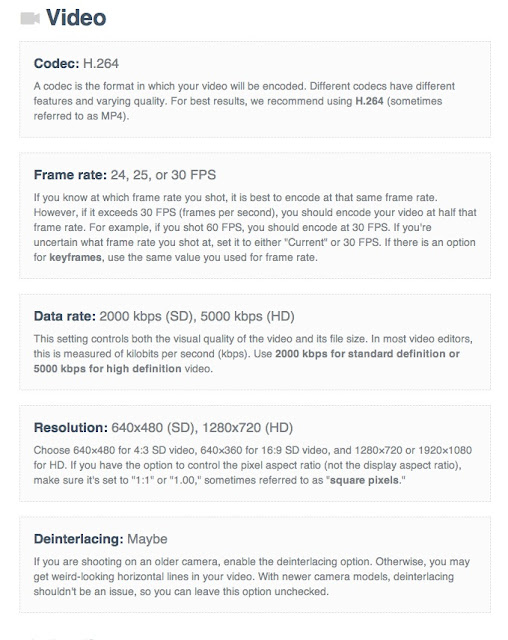

1. File > Export Using Quicktime Conversion a. CLick on OPTIONS b. Click on VIDEO SETTINGS:

2


2. Change your video settings as follows: 
a. Make sure H.264 is selected
b. Make sure current FPS (or desired fps) is selected
c. Change Data Rate: from Automatic to RESTRICT to 5000 for HD (or 2000 for SD) 
d. click OK to save your settings


3. Under Video Settings Click on SIZE and select what Vimeo recommends (the shorter the project the larger settings you may use --- typically 1280 by 720, but you can experiment here).


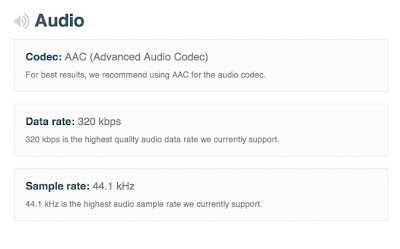
4. Click on SOUND SETTINGS

a. Change Format form Linear PCM to AAC
b. Change Rate from 48 to 44.100
c. Change Quality from Normal to Best
d. Change Target Bit Rate to 320
e. Click OK to save your settings


5. SAVE YOUR FILE ---- NOTE on FILE NAME
When you save your file DO NOT use any spaces, dashes, funky characters, or a long name. If you must indicate a space, please use _ such as Group1_Titanic or Group2_Professional. File names that don't follow this will often have errors in Vimeo upload (and will make you crazy!)


TO UPLOAD VIMEO CLIP TO CLASS BLOG:

1. Click SHARE on Vimeo clip

2. Copy the EMBED code

3. Log in to blogger.com account

4. Select TCF 312 CLASS blog in your dashboard list

5. Click NEW POST

6. Click on HTML tab (top right)

7. Paste the Vimeo EMBED code

8. Click on COMPOSE tab (top right next to HTML tab)

9. Type name/# of exercise in title and type of all group member names in body of post. Share any important notes such as type of camera, camera log information, etc.


+ + + +


IF YOU ARE NEW TO FCP7 OR CONFUSED FROM CLASS, YOUTUBE HAS TUTORIAL SUCH AS THESE:

For JVC footage (SD cards), please LOG & TRANSFER into FCP7, such as demonstrated here:


Here's a tutorial for HDV footage (tape media) LOG & CAPTURE, such as demonstrated here:

Assignment: Individual Blog Post #3 :: GOALS

Post is due before class on Thursday, July 12.


What are your goals in terms of filmmaking? What, then, are your learning goals for this course? What courses and/or projects in TCF (and beyond) have helped illuminate your thoughts. Have you worked in some area of production or post-production that has helped to inform your thoughts, or why are you pursuing some aspect of TCF. In short, I'm looking to understand more about your skills, background, motivations and goals for film/video production (or what area you're most interested in).


Please write a 250 - 300 word entry.


POST ENTRY ON YOUR BLOG! 

Opportunity for Videographer (could be GREAT for reel)

The Hot Hundred bicycle ride is scheduled for July 28th and is staged at the University Rec Center.  We are looking for someone interested in donating services as a videographer in order to gain portfolio material.  We expect ~400 cyclists.  Ride distance options are from 29 to 103 miles through Tuscaloosa and Greene Counties.  We'll be hosting 24 Wounded Warriors from Fort Benning and Fort Stewart, GA. The event benefits the Tuscaloosa Community Mental Health Task Force and the advocacy efforts of the Druid City Bicycle Club. http://bikehothundred.com Contact Pixie Hicks if you might be interested in producing a video that could be used to promote future events. Pixie Hicks Ride Director 205-394-6152 pixdash1@comcast.net

Tuesday, July 10, 2012

Lecture & Exercise: Using Filters


1. READ: How, When and Why to Use a Polarizing Filter


2. WATCH:


Note: the effect of the filter and how the effect is adjusted by rotating the filter


3. GO FILM - see below!


TCF 312 – Group Exercise #2: SONY HDV with FILTERS


TCF has the following filters for SONY HDV cameras:

1. color graduated filter
2. polarizer
3. soft
4. black pro mist 
5. warm black diffusion
6. enhancing
7. gold diffusion
8. ultra contrast


Working in a group of 3 students, you are to film well-composed shots, using strong framing and compositional elements to produce visually compelling images, which speak --- think content and form discussion from class.

5 Shot Exercise Using SONY HDV and filters:
  1. Enhance the sky of a landscape
  2. Reduce glare on glass
  3. Reduce glare on water
  4. Soften a shot using a filtered effect
  5. Enhance a shot w/color or detail using a filter

Rules:
  • Record color bars at the head of your tape
  • Film a visual slate w/name of camera operator (rotate who operates)
  • Film 15-20 seconds of shot w/no filter
  • Film 15-20 seconds of shot w/filter
  • Manual settings required for white balance, iris & shutter speed
  • Keep a camera log for each shot – note the shutter & iris settings
  • NO GAIN should be used in any shot!


RETURN YOUR CAMERA TO THE EQ ROOM
between 12:15 and 12:30 pm!


* * * * * 
DSLR BONUS:

Next we move to DSLR cinematography. One of the limitations of these cameras is the moire effect. Here's a filter that eliminates it! We don't have one (yet) in TCF, but watch how it works:


Canon 7D Anti-Aliasing Filter Review - Clean! from cinema5D on Vimeo.

Here are some links about it that you should read

1. NoFilmSchool's post with Philip Bloom video about 5D filter fix


CLASS SCHEDULE UPDATES

Remember on the syllabus where it said "subject to change!" so I have to change a couple of things.

Your HOMEWORK assignments will NOT change. Read and post as regularly assigned.

Here are a couple changes for in-class time, this week:

TUESDAY, JULY 10:: CAMERA SPECS: JVC v. SONY HDV
We won't be filming Group Exercise #1.
We will be going over JVC and HDV cameras and learning about camera specs (ppt)


WEDNESDAY, JULY 11 :: FILMING GROUP EXERCISES
We won't meet in 130.
You will meet Teddy in the EQ room promptly at 9:30 am.

At 9:30, please check out equipment for Exercise #1:
JVC Hmu100
Tripod
Fishpole
Shotgun Mic

You will need to provide a Class 6 (or Class 10 SD card) or the EQ rm has 3 left for sale for $20. Cash accepted, checks are preferred.

10 - 11 am: Film Group Exercise #1 (on JVC camera, in 3 groups of 5 students)

11 am: Return JVC camera & sound gear

In groups of 5 students, check-out EQ for Exercise #2:

SONY HDV
tripod
filter pack - check that your pack doesn't have 6 polarizers and that is all.

You will need a mini-dv tape. They are for sale in the EQ rom for $5 per tape.

11:30 - 12:30 pm: Film Group Exercise #2 (on SONY HDV camera, 5 groups of 3 students)

by 12:30 pm: Return all gear to the Equipment Room


THURSDAY, JULY 12: HOW TO VIMEO 4COURSE BLOG

BRING YOUR SD CARDS & TAPES --- You will need in class!

We'll go over logging & transferring footage (JVC import) in FCP
We'll go over capturing tape using Canon HV40 (capture cameras) in FCP

We'll go over rendering, exporting, compressing and uploading to Vimeo then, we'll continue with the ppt on primes vs. zoom lenses, and move on the DSLR cinematography.

Assignment: Individual Blog Post #2 :: VISUAL INPSIRATION

This post is due before class on Wednesday, July11.


What is your visual style?  What imagery is compelling to you, and why?


For this post you need to gather 5 to10 images: stills from films, movie posters, photographs, movie covers, magazine spreads, website pages… any images that move you [make you think, feel, provoke, inspire, etc.] These images could be things that you love or hate... just talk about why. 


Write a 250 - 300 word reflection on the stylistics elements of the image, such as the framing, composition, color palette, aesthetics, etc... how is the FORM influencing your reading / reaction / understanding of the CONTENT (or message) of the imagery.


Embed images that you discuss in your post & where possible, link to the artist's site or the site where you found this image.


POST YOUR RESPONSE ON YOUR BLOG!


+ + + 


DOC's EXAMPLE:


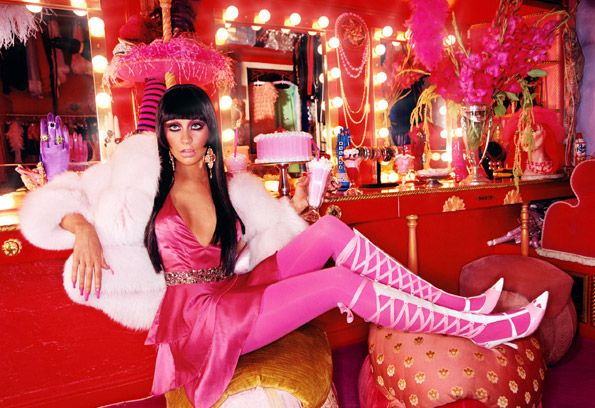
In this image by photographer David LaChapelle, he provides us a "clean" slate - the imagery is free of the normally cluttered and visually overwhelming imagery typical of his work. I "love" his use of the bottom left lower third (though the cropped frame being almost square sort of disrupts the typically layout and composition), like this mess of an image of Christina Aguilera:


Back to the image at hand (pun intended), he places her protruding rear at the bottom left, while strategically placing her eyes in the top third, dead center of frame. The color o the light, a soft center spot light illuminating her head and bust, matches the warm tone of her brown skin. The good: technically this image is clean, it's strong, and it speaks volumes. The bad: the message here disturbs me. What I read is that Kim (and in a sense all Black and Brown women's bodies) are there to be displayed (strategically), and literally stamped with branding and sold, no more or no less than a knock off Louis V purse. The ugly: This imagery circulated heavily in Vibe magazine and has become an iconic image, but maybe it's better than his depiction of Kim as an infantilized blow-up doll:


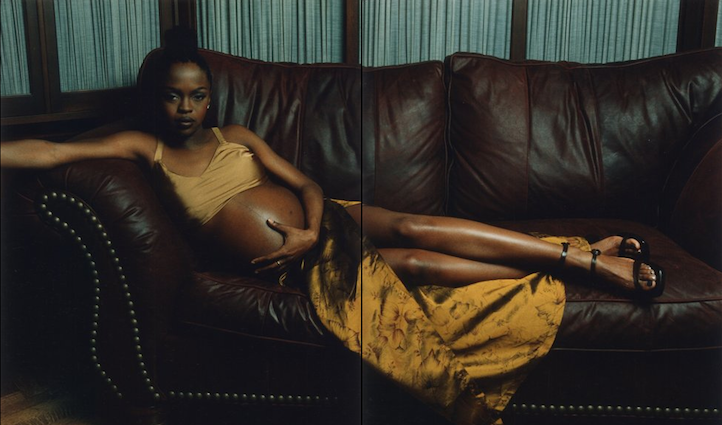
One of my FAVORITE photographers, whose work is stylistially very much in contrast to the work posted above is Brian B+ Cross.


In this documentary style photography of Lauryn Hill, you see a very different depiction of Black womanhood and sexuality. The color palette is also a brown, earthtone scale, but is dark and shadow - Hill's face is coming from out o a dark shadow. In this image her face is framed in the upper left third, forcing our eyes to have to move to the left to look her in the eye, and still the low-key lighting doesn't fully allow it. Unlike Kim's blow-up doll with perfectly high-key lighting, framing and color that leads the camera right to her eyes, Lauryn engages us in a very different way....

You catch what I'm going for here? If you don't email.


Key Quote from Assigned Reading


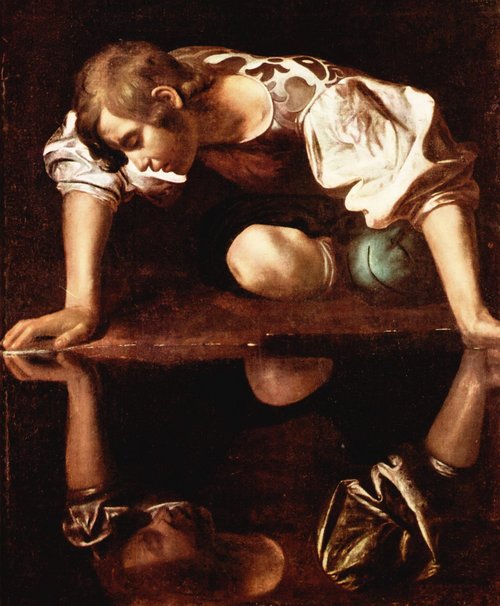
Cinematography is not about equipment, technology or even beautiful sunsets or vistas. I believe we affect the audience in a much more subtle way. It's about the composition and lighting and storytelling. I believe actors respond to light. Just look at a Rembrandt or Caravaggio painting, or any of the Dutch masters, and tell me light isn't important.
          - Wally PfisterASC (page 63 of Cinematography for Directors)


Friday, July 6, 2012

Ten Things About Me: Dr. Raimist

My favorite things to watch, in no particular order:

one. Leon: The Professional


two. City of God


three. Say Anything


four. The Vampire Diaries


five. River Monsters


six. Our America with Lisa Ling


seven. Dexter


You can watch the film here!


nine. POV on PBS


ten. OWN --- yes, Oprah's new (failing) network.

My favorite show (which hasn't aired in a year) is Inside the Creative Mind. Now you might think I'm obsessed with James (because of use of Titanic clip in class, but I love all the episodes, see here:


Inside James Cameron's Creative Mind
Whether propelling filmmaking to new frontiers with movies like Titanic and Avatar, or exploring the oceans mysterious secrets, James Cameron offers viewers a never-before-seen look at his remarkable career as a writer, director, producer, and innovator.


Visionaries: will.i.am on Music as Medicine
Visionary songwriter, producer, performer and artist will.i.am describes how music -- and not Ritalin -- is his cure for Attention Deficit Disorder (ADD). Plus, find out what his instrument of choice is. (Hint: it's not something you can buy at a music shop).


Inside Tyler Perry's Creative Mind
Meet Tyler Perry: Writer. Director. Actor. Composer.